Google AI Overviews now appear on a significant share of informational queries. When they do, they push organic results down the page and capture the user's attention before any link gets a click. Being cited as a source inside an AI Overview is measurably better than ranking below one.
This guide is a step-by-step optimization workflow. Not a list of signals - a practical sequence you can apply to any existing page in under two hours. If you want to understand the full signal set first, read How to Get Your Content Into Google AI Overviews before continuing.
Quick answer
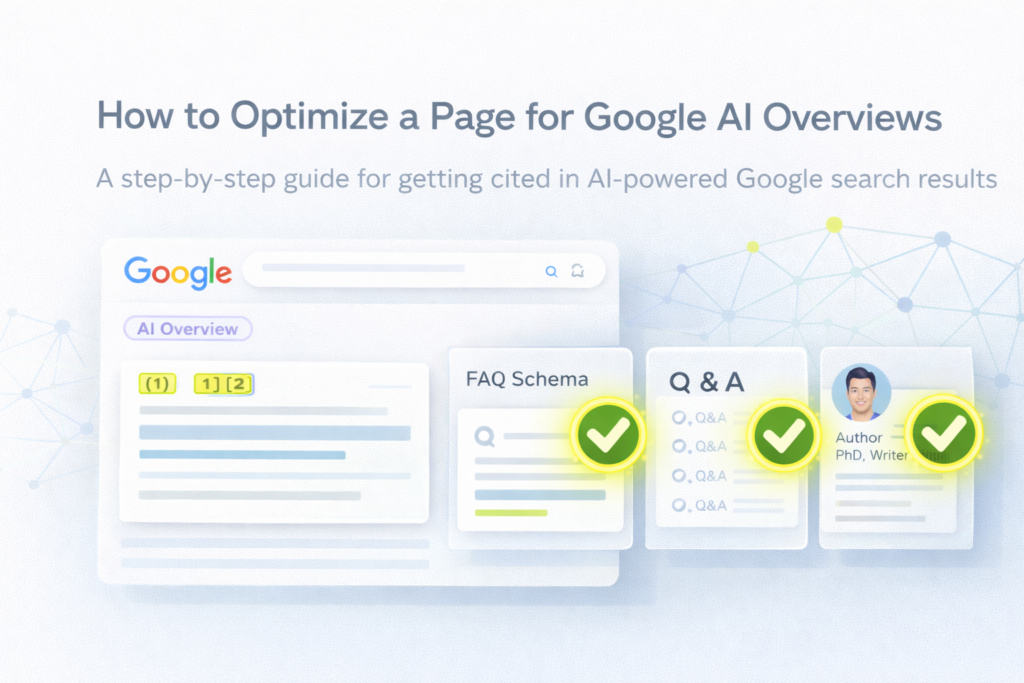
To optimize a page for Google AI Overviews: rewrite the opening paragraph as a direct answer to the target query, add the query as an H2 heading, include a FAQ section with at least 4 explicit Q&A pairs, add FAQ schema markup, ensure a named author with credentials is visible, and verify the page ranks in the top 20 organic results. These six steps cover the majority of the citation gap for most pages.
What Google AI Overviews actually need from your page
Google AI Overviews do not summarize your page. They extract a passage - a specific, self-contained answer to the query - and present it alongside 3 to 5 other cited sources. The system is looking for one thing above all: a page that answers the query directly, clearly, and credibly enough to be quoted in front of a user.
This has a concrete implication: a page ranked #7 with the right structure will frequently beat a page ranked #1 with poor structure. Ranking gets you into the candidate pool. Structure determines whether you get selected.
Why this matters more than ever
Ahrefs analyzed 300,000 keywords and found that the presence of an AI Overview correlates with a 58% lower click-through rate for the top-ranking page. But brands cited within an AI Overview earn +35% more organic clicks than brands on the same query that are not cited, according to Seer Interactive's analysis of 25.1 million impressions. The gap between cited and not cited is large and growing.
Sources: Ahrefs (December 2025), Seer Interactive (September 2025)
Step-by-step: how to optimize a page for Google AI Overviews
Step 1 - Identify the exact query you want to appear in
Before touching the page, get precise about the query. Not the topic - the specific question a user types. "AI search optimization" is a topic. "How do I get my content into Google AI Overviews?" is a query. These are different, and optimizing for the wrong one is the most common mistake.
How to find the right query: search your topic in Google and note the AI Overview if one appears. Look at "People Also Ask" for phrasing. Check Google Search Console for the actual queries driving impressions to the page.
Output: one primary query written out in full, exactly as a user would type it.
Step 2 - Add the query as an H2 heading
Use the exact query as an H2 heading on the page. Not a paraphrase - the literal question. This signals to Google's extraction system that this section directly addresses that query, and makes the answer that follows clearly attributable to that specific question.
Example:
Before
H2: Optimizing for AI Overviews
After
H2: How do I get my content into Google AI Overviews?
Step 3 - Rewrite the opening paragraph as a direct answer
The first paragraph under your H2 heading needs to be a complete, standalone answer to the query. Not an introduction. Not context. The answer. Write it so that someone reading only that paragraph would have a useful, accurate response to the question.
The format that works best: one or two sentences stating the answer directly, followed by one sentence specifying the most important caveat or condition. Then add context, explanation, and supporting detail in the paragraphs that follow.
Test: if you removed everything after the first paragraph, would a user have a genuinely useful answer? If no, the paragraph is not direct enough.
Step 4 - Add a FAQ section with explicit Q&A pairs
FAQ sections are the single highest-leverage structural change you can make for AI Overview optimization. They give Google pre-formatted extraction units - a question followed immediately by its answer - that map directly to how AI Overviews present information.
Requirements for an effective FAQ section:
- →Minimum 4 questions, ideally 6 to 8
- →Each question phrased as a user would actually ask it
- →Each answer 2 to 5 sentences - complete but extractable
- →Questions cover different aspects of the topic, not variations of the same question
Where to find the right questions: "People Also Ask" in Google for your target query, your own internal search data, and the questions users actually email or message you about.
Step 5 - Add FAQ schema markup
FAQ schema (JSON-LD) tells Google that your page contains a structured Q&A section and makes its content machine-readable. It does not guarantee AI Overview inclusion, but it removes ambiguity - Google does not need to infer that your section is a FAQ, it knows.
If you use Yoast SEO and Gutenberg, the FAQ block generates schema automatically when you use Gutenberg's native FAQ block. If you use Elementor, add the JSON-LD manually in the page's custom HTML or via a schema plugin.
Validate your schema with Google's Rich Results Test after implementation. A schema error is worse than no schema - it can confuse the extraction system.
Step 6 - Make author credentials visible
Google AI Overviews apply E-E-A-T evaluation at the author level. A page with a named author whose credentials are verifiable and relevant to the topic scores higher on trust signals than an anonymous page, even if the content quality is equivalent.
Minimum requirements: a named byline, an author bio with credentials specific to the topic (not generic), and a publication date. Ideally: a link to an author page with verifiable external presence (LinkedIn, publications, professional association).
First-person experience markers matter: language like "In my analysis of 50 client sites" or "When I tested this on our own content" adds Experience signals that generic third-person writing cannot provide.
Step 7 - Add specific data points with named sources
Pages with specific, verifiable claims are selected more often than pages with general statements. This is not a minor signal - factual density is one of the clearest differentiators between pages that appear in AI Overviews and pages that do not.
Target 3 or more data points per 500 words. Each one should include the specific number, the named source, and ideally the date of the research. Link to the primary source, not to another blog post that mentions it.
Example:
Weak claim
"Studies show that AI Overviews reduce organic traffic."
Strong claim
"Ahrefs found a 58% CTR drop for top-ranking pages when AI Overviews appear (300,000 keywords, December 2025)."
Step 8 - Verify the page ranks in the top 20
All other optimizations are irrelevant if the page does not rank within the first two pages of Google results. AI Overviews draw from a candidate pool that is essentially Google's top 20 results for the query. A page outside that pool is not considered for citation regardless of content quality.
Check: search your target query in an incognito window and find your page. If it is not on page 1 or 2, prioritize traditional SEO improvements (internal linking, backlinks, on-page optimization) before investing in AI Overview-specific optimizations.
Complete optimization checklist
| Action | Priority | Time needed |
|---|---|---|
| Add exact query as H2 heading | Critical | 5 min |
| Rewrite opening paragraph as direct answer | Critical | 15 min |
| Add FAQ section (4 to 6 Q&A pairs) | Critical | 30 to 45 min |
| Add FAQ schema (JSON-LD) | High | 15 to 30 min |
| Add named author with credentials | High | 10 min |
| Add 3+ data points with named sources | High | 20 to 30 min |
| Verify page ranks in top 20 | Prerequisite | 5 min |
How to know if it worked
After implementing these changes, allow 7 to 14 days for Google to recrawl and re-evaluate the page. Then check:
- →Manual check: search your target query in Google and look for an AI Overview. Is your page cited? Note the date and the query.
- →Google Search Console: monitor impressions and CTR for the target query. An AI Overview citation typically increases impressions significantly while CTR may vary - both are signals of citation activity.
- →Organic traffic: a sustained traffic increase on the page without a corresponding ranking improvement is often a sign of AI Overview citation driving additional clicks.
Want to audit a specific page before you start?
GEOscore audits your content against the signals that drive Google AI Overview citation - per-criterion breakdown, score out of 10, and prioritized quick wins in under 30 seconds. Paste any text, including drafts. No URL needed.
Audit your content with GEOscore →FAQ
How long does it take to appear in Google AI Overviews after optimizing?
Typically 7 to 21 days after Google recrawls the updated page. The timeline depends on how frequently Google crawls your domain - higher-authority sites with frequent crawl schedules see changes reflected faster. Request indexing in Google Search Console after publishing your updates to accelerate the crawl.
Do I need to optimize every page, or just my most important ones?
Start with the pages that already rank in positions 4 to 15 for informational queries and are not currently cited in AI Overviews. These are your highest-leverage targets - they are already in the candidate pool, and a structural improvement can push them into citation range. Pages outside the top 20 need traditional SEO work first before AI Overview optimization is worthwhile.
Can I appear in an AI Overview without a FAQ section?
Yes. FAQ sections are high-leverage but not required. Pages can be cited based on any well-structured, directly answering passage. Definition paragraphs, numbered step lists, and comparison tables are all frequently extracted by AI Overviews. The FAQ section is the highest-probability format, not the only one.
Does Google AI Overviews optimization differ from optimizing for ChatGPT or Perplexity?
The foundational signals overlap, but there are meaningful differences. Google AI Overviews require ranking in the top 20 - a threshold that ChatGPT and Perplexity do not have in the same way. Google also weights structured data (schema) more explicitly. Perplexity weights recency more heavily than Google. A page optimized for Google AI Overviews will perform well on other platforms, but platform-specific adjustments increase citation probability on each. See How to Get Cited by ChatGPT and How to Appear in Perplexity Search for platform-specific guidance.
Should I be concerned that being cited in AI Overviews reduces my organic clicks?
The data suggests the opposite for cited pages. Seer Interactive found that brands cited in AI Overviews earn 35% more organic clicks and 91% more paid clicks compared to brands on the same query that are not cited. The concern applies to the overall query - AI Overviews reduce total clicks available. But among the pages competing for those clicks, being cited is a strong advantage.
Sources
- Ahrefs - Update: AI Overviews Reduce Clicks by 58% (300,000 keywords, December 2025)
- Seer Interactive - AIO Impact on Google CTR: September 2025 Update (25.1M impressions)
- Search Engine Land - New data: Google AI Overviews are hurting click-through rates
- Google - FAQ structured data documentation